

Less busywork.
More room for your best ideas.
A personal AI workflow turns a vague request into a clear brief, an editable draft, and a result you have actually checked.
Your first experiment with AI does not need to involve complicated software or an automated business. Start with one task you repeat: planning an article, organizing meeting notes, or preparing a customer reply. The useful question is simple: which part of this task needs help, and which part still needs your judgment?
This guide gives you a practical system you can adapt to your own work. The prompts are templates, not promises of a perfect result. Use fictional examples or information you are authorized to share when testing them.
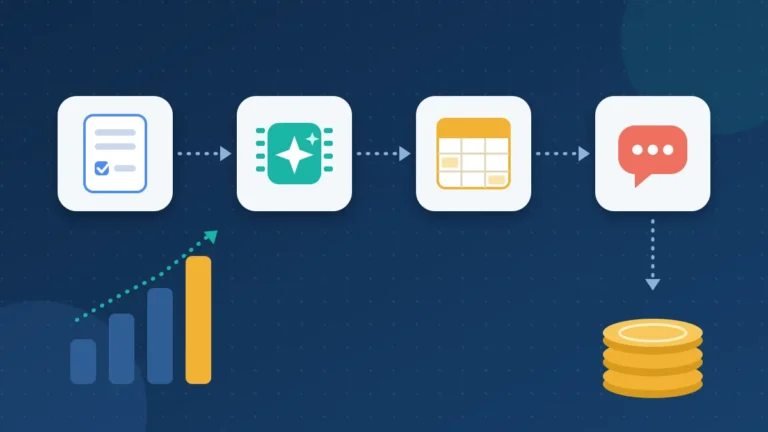
Brief clearly
Define the task, audience, inputs, and boundaries.
Build in stages
Review the outline before asking for a complete draft.
Check the result
Verify details and make the final decision yourself.
Start with one small, repeatable task
Choose a task with a clear finish line. “Help me with marketing” leaves too much undefined. “Turn these five approved product facts into three short newsletter introductions for existing customers” is a much more useful brief.
Write down how you currently complete the task. Note the steps that take effort, the information required, and what a good result looks like. This gives you a baseline for deciding whether adding AI is actually helpful. If correcting the output takes longer than doing the task yourself, simplify the task or change your approach.
A prompt that gives your task direction
Use four ingredients: context, goal, constraints, and output format. Add the source material separately so the assistant can distinguish your instructions from the text it should work with.
Help me create [deliverable] for [audience]. The goal is [specific outcome]. Use only the approved facts below. Keep the tone [tone] and the length around [length]. Do not invent statistics, testimonials, or product claims. If information is missing, list questions instead of guessing. First propose an outline and wait for my feedback.
Approved material: [Paste non-sensitive source notes here.]
For example, a freelancer could use this structure to draft a project update. The source notes might contain completed tasks, open questions, and an agreed deadline. The first output should organize those facts, rather than silently adding a promise the freelancer has never made.
Use a three-pass review
| Pass | Ask the AI to help with | Your responsibility |
|---|---|---|
| Structure | Group ideas and suggest an outline | Choose the message and priorities |
| Draft | Write from the approved outline | Check accuracy, tone, and missing context |
| Refine | Shorten repetition and clarify wording | Approve the final version before sharing |
Keeping these passes separate makes mistakes easier to spot. When the outline is wrong, fix it before polishing paragraphs. When the facts are uncertain, resolve them before asking for a more persuasive version.
Review names, dates, figures, links, and promises against the original material. A confident sentence is not evidence. For important factual claims, check a reliable primary source directly.
Your seven-day starter plan
- Day 1 — Pick one task. Choose a low-risk activity with a clear result.
- Day 2 — Write the brief. Identify your audience, inputs, constraints, and preferred format.
- Day 3 — Test a small example. Work with fictional or non-sensitive information.
- Day 4 — Review the gaps. Record what was wrong, vague, or unnecessary.
- Day 5 — Improve the prompt. Add a useful example or clarify an ambiguous instruction.
- Day 6 — Repeat the task. Compare the effort and quality with your usual process.
- Day 7 — Keep what works. Save the prompt and a simple review checklist.
Choose a tool around the job
Before signing up for another service, decide whether you need writing assistance, image editing, document analysis, or an automated connection between apps. Test the smallest useful workflow first. Check the provider’s current privacy settings, supported inputs, usage limits, and subscription terms before uploading work or paying.
For shared work, agree on who can use the tool and which information can be entered. Keep passwords, private customer records, and confidential files out of experiments unless your organization has approved that use and the appropriate protections are in place.
Questions before you start
Do I need several paid tools?
No. Begin with a tool you already have permission to use. Add another only when you can identify a specific missing capability and justify its cost.
Can I publish the first draft immediately?
Review it first. Check facts, permissions for source material, brand tone, and any commitments in the text. You remain responsible for what you publish.
How do I know the workflow is worthwhile?
Compare the full process, including review and corrections, with your previous method. Keep it if the result meets your quality standard with a useful reduction in effort.
Make one task better today.
Choose a small job. Give it a clear brief. Review the result. A useful AI workflow grows from a process you understand and can repeat.
TechAndWealth practical guide • Original educational content. Examples are illustrative; no productivity or income result is guaranteed.